MTF-01 Optical Flow Setup
MicoAir MTF-01 integrates optical flow + laser rangefinder in one module, enabling position hold in GPS-denied environments (indoor, under bridges, beneath canopy). This guide covers integration with SparkNavi Blue.
Hardware Wiring#
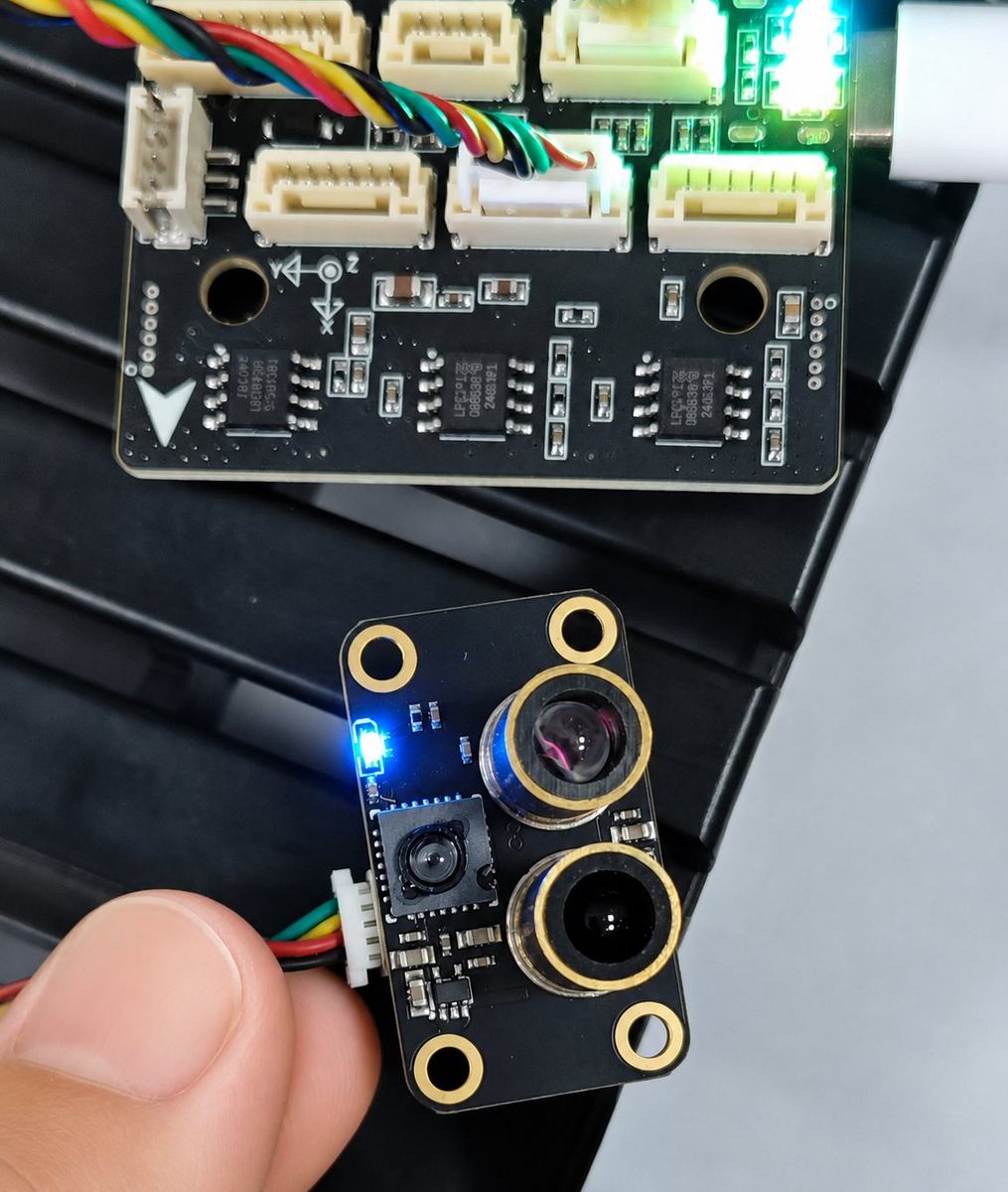
Connect MTF-01 to the SparkNavi Blue TELEM2 port (UART communication).
TELEM2 pinout:
| Pin | Signal | Description |
|---|---|---|
| 1 | +5V | Peripheral power |
| 2 | TX | UART send (to MTF-01 RX) |
| 3 | RX | UART receive (from MTF-01 TX) |
| 4 | CTS | Flow control (unused here) |
| 5 | RTS | Flow control (unused here) |
| 6 | GND | Ground |
micoAssistant Pre-Setup#
⚠️ Important: when using ArduPilot 4.5.0 or newer, ArduPilot may not recognize the MTF-01 with default MAV_ID.
Use micoAssistant to connect to MTF-01 first and adjust:
1. Set Communication Protocol
In the RangeSensor settings dialog, set Protocol to Mav_APM (or PX4 if you use PX4 firmware).
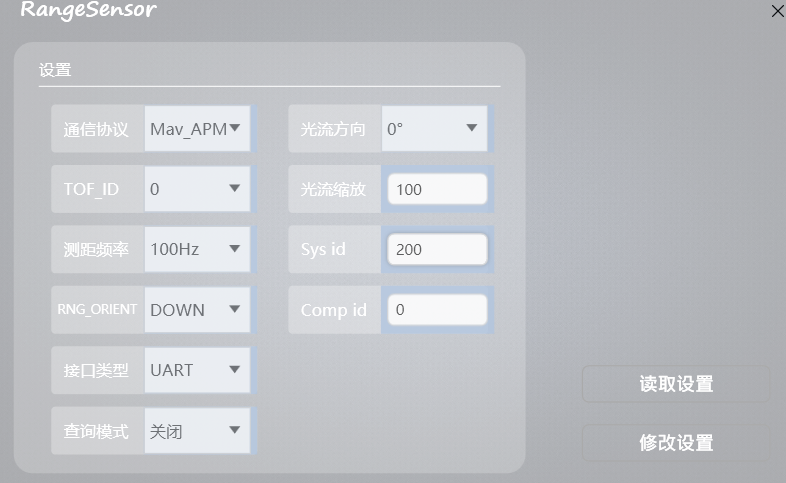
2. Modify MAV_ID
Change MAV_ID (shown as Sys id) to 200 (any value other than the default 1; 200 is common).
3. Other Settings
| Field | Value | Description |
|---|---|---|
| Protocol |
| ArduPilot firmware |
| Optical flow direction |
| Mounting rotation |
| TOF_ID |
| Rangefinder ID |
| Measurement frequency |
| Laser update rate |
| RNG_ORIENT |
| Pointing down |
| Interface type |
| Serial mode |
| Optical flow scaler |
| Flow gain — adjust by airframe size |
| Sys id |
| MAV_ID (non-default) |
Click Modify Settings to write to MTF-01.
ArduPilot SERIAL2 Configuration#
In Mission Planner Config → Full Parameter List:
| Parameter | Value | Description |
|---|---|---|
SERIAL2_PROTOCOL | 1 (MAVLink1) | TELEM2 protocol |
SERIAL2_BAUD | 115 (115200) | TELEM2 baud rate |
SERIAL2_OPTIONS | 0 | Keep default 0 on ArduPilot 4.6.3+ ; older versions may need 1024 (Don't forward MAVLink to/from) |
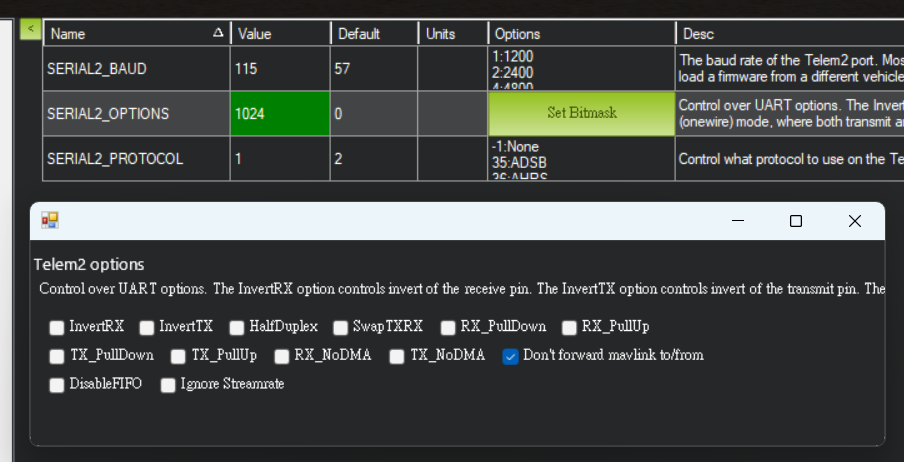
⚠️ Version notes: - ArduPilot 4.6.3 and newer: SERIAL2_OPTIONS stays at 0 - ArduPilot 4.5.x – 4.6.2: SERIAL2_OPTIONS may need 1024 (check "Don't forward mavlink to/from")
Distance Sensor (RNGFND1) Setup#
After rebooting, these parameters become available:
| Parameter | Value | Description |
|---|---|---|
RNGFND1_TYPE | 10 (MAVLink) | Rangefinder type |
RNGFND1_ORIENT | 25 (Downward) | Mounting orientation |
RNGFND1_MIN_CM | 5 | Minimum effective range (cm) |
RNGFND1_MAX_CM | 1200 | Maximum effective range (cm) |
RNGFND1_ORIENT = 25 corresponds to "Downward" per the official parameter docs.
Optical Flow (OPTFLOW) Setup#
| Parameter | Value | Description |
|---|---|---|
FLOW_TYPE | 5 (PX4Flow) | Optical flow type (MAVLink) |
FLOW_FXSCALER | 0 | X-axis gain (start at 0, tune in flight) |
FLOW_FYSCALER | 0 | Y-axis gain |
FLOW_ORIENT_YAW | 0 | Mounting yaw rotation (degrees) |
Verification#
After setup and reboot, in Mission Planner Status page:
- sonarrange: live rangefinder reading (changes with altitude)
- flow_x / flow_y: optical flow velocity
On the ground, moving the flight controller laterally should change flow_x / flow_y; raising or lowering the FC should change sonarrange.