DroneCAN Barometer Setup
SparkNavi Blue includes 2× CAN FD ports (CAN1 / CAN2) with full support for the DroneCAN protocol (formerly UAVCAN), including barometers, GPS, ESC, etc. This guide covers DroneCAN barometer modules.
Hardware Wiring#
Connect the DroneCAN barometer to the SparkNavi Blue's CAN1 or CAN2 connector.
CAN connector pinout:
| Pin | Signal | Description |
|---|---|---|
| 1 | +5V | Peripheral power |
| 2 | CAN_H | CAN high line |
| 3 | CAN_L | CAN low line |
| 4 | GND | Ground |
Enable CAN in ArduPilot#
In Mission Planner Config → Full Parameter List:
| Parameter | Value | Description |
|---|---|---|
CAN_P1_DRIVER | 1 | Enable CAN1 driver |
CAN_D1_PROTOCOL | 1 (DroneCAN) | Set protocol to DroneCAN |
CAN_P2_DRIVER | 1 | Enable CAN2 driver |
CAN_D2_PROTOCOL | 1 (DroneCAN) | Set protocol to DroneCAN |
Reboot the flight controller after writing parameters.
Verify Module Online#
In Mission Planner Setup → Optional Hardware → DroneCAN/UAVCAN, click MAVlink-CAN1:
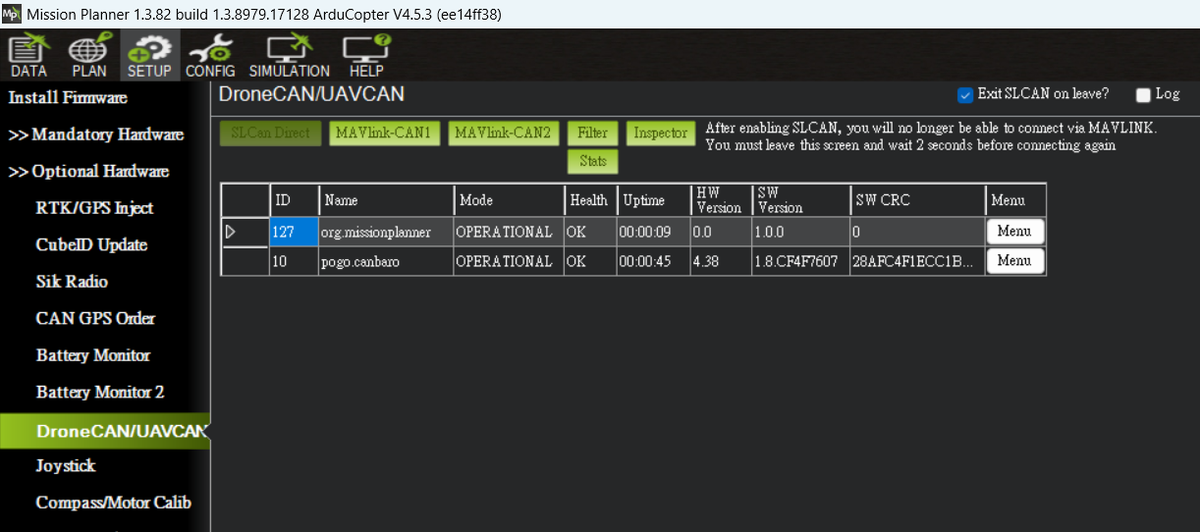
A connected module (e.g., pogo.canbaro for a barometer) should appear with Mode = OPERATIONAL and Health = OK.
View Detailed Protocol Data#
Click Inspector to see all DroneCAN messages from the module:
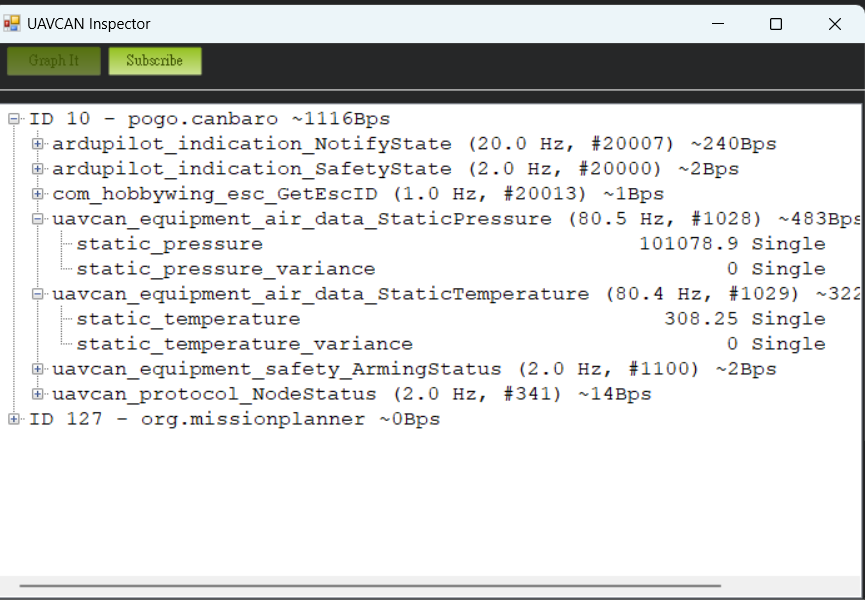
Sample output:
ID 10 - pogo.canbaro ~1116Bps
  ardupilot_indication_NotifyState (20.0 Hz)
  ardupilot_indication_SafetyState (2.0 Hz)
  uavcan_equipment_air_data_StaticPressure (80.5 Hz)  ← live barometer
    static_pressure         101078.9 Pa
  uavcan_equipment_air_data_StaticTemperature (80.4 Hz)
    static_temperature      308.25 K
  uavcan_equipment_safety_ArmingStatus (2.0 Hz)
  uavcan_protocol_NodeStatus (2.0 Hz)
Confirm Data Reaches the Flight Controller#
In Mission Planner Status page, you should see:
- press_abs2: secondary barometer absolute pressure (from DroneCAN module)
- press_temp2: secondary barometer temperature
Continuously updating values mean the CAN link works.
FAQ#
Q: No nodes appear after clicking MAVlink-CAN1?
A: Check: 1. Wiring (CAN_H / CAN_L not swapped) 2. CAN bus termination (120 Ω, usually built into the module) 3. Both CAN_P1_DRIVER and CAN_D1_PROTOCOL are set 4. Flight controller has been rebooted
Q: Inspector shows messages but Status doesn't show press_abs2?
A: Verify your ArduPilot firmware version supports secondary baros via DroneCAN. You may need to set BARO2_DEVID to match the DroneCAN ID.